Lagario 3: Órbita · Modes guide
Lagario 3 game modes, modifiers and power-ups
Lagario 3 has 5 game modes, 8 room modifiers you can stack on top of them and 3 power-ups. This page explains how each one changes the game, which hazards and objects each mode has, how the Collapse battle royale runs its rounds, and how rooms, bots, invite links and the Play button work.
The 5 modes at a glance
| Mode | In the game | Physics | After you're eaten | Start mass |
|---|---|---|---|---|
| Orbit | Real gravity: stars that burn, orbits, slingshots and collisions that knock chunks off. | Orbit | Respawn | 15 |
| Free for all | The classic: eat or be eaten. | Classic* | Respawn | 15 |
| Collapse | Battle royale: the universe shrinks. Last planet standing wins. | Classic* | Watch until the next round | 25 |
| Teams | Mars × Neptune × Earth. Allies cannot eat each other. | Classic* | Respawn | 15 |
| Gravity chaos | Strong gravity, more black holes and power-ups. | Classic* | Respawn | 35 |
* Any of these can get Orbit's physics with the Orbit physics modifier. The Giant start modifier raises every start mass to 120.
Orbit: the default mode
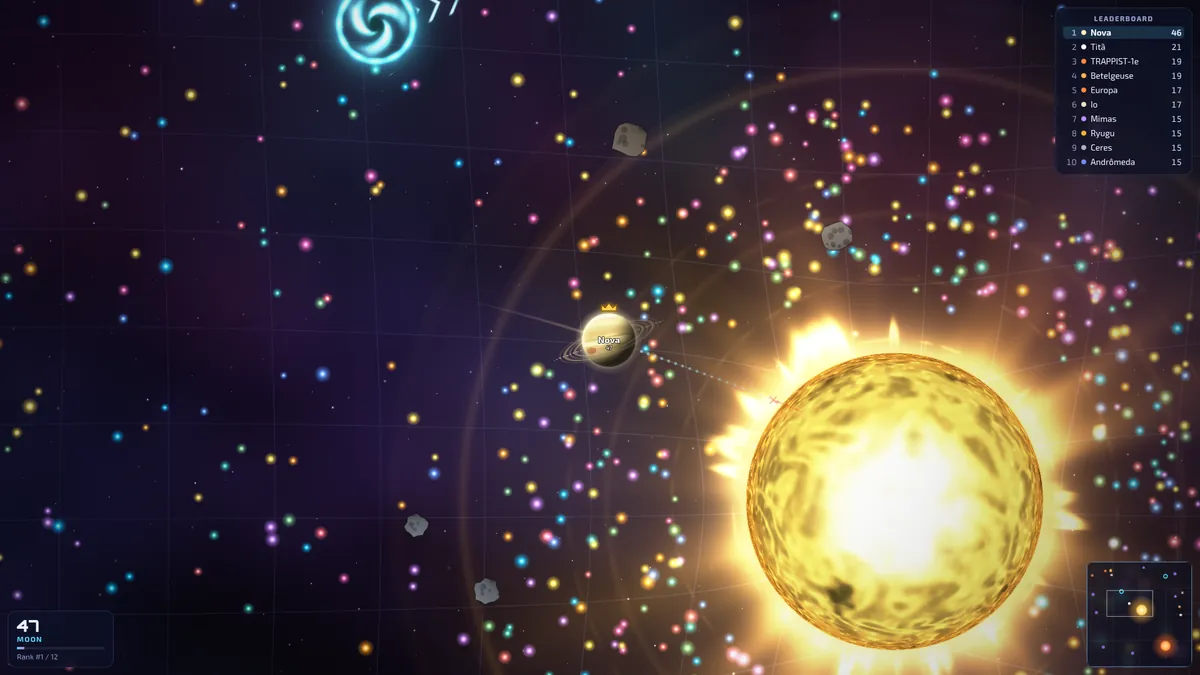
Orbit is what Create room selects first and what Play looks for first. It runs the full physics: momentum, inverse-square gravity from stars, black holes and big planets, gravity slingshots, collisions between planets too close in size to eat each other, and thrust when you eject mass. The gravity guide explains all of it in detail. What the mode adds to the map:
- Fixed stars: 1 on a small map, 2 on a medium one, 3 on a large one. They burn whatever touches them.
- Dust rings and asteroid belts: 35% of new stardust settles in a ring around a star, and asteroids circle the stars in belts.
- 10% more stardust than the classic modes, and 40% fewer black holes, since the stars are the big hazard here.
- Comets that curve around stars, and a trajectory line that shows where gravity is taking you.
Free for all: the classic
Eat or be eaten, with the classic physics. There are no stars. Your planet still has inertia, but it responds twice as fast as in Orbit and has no slingshot. Planets too close in size to eat each other simply overlap, and ejecting mass doesn't push you.
Gravity here is “predator gravity”: a planet of 60 mass or more drags in nearby planets it could eat, within 3.2 of its radii plus 220 units, harder the bigger it is and the closer you are. Black holes pull everything within 5.5 of their radii. If a big planet is pulling you in, run early.
Collapse: the battle royale
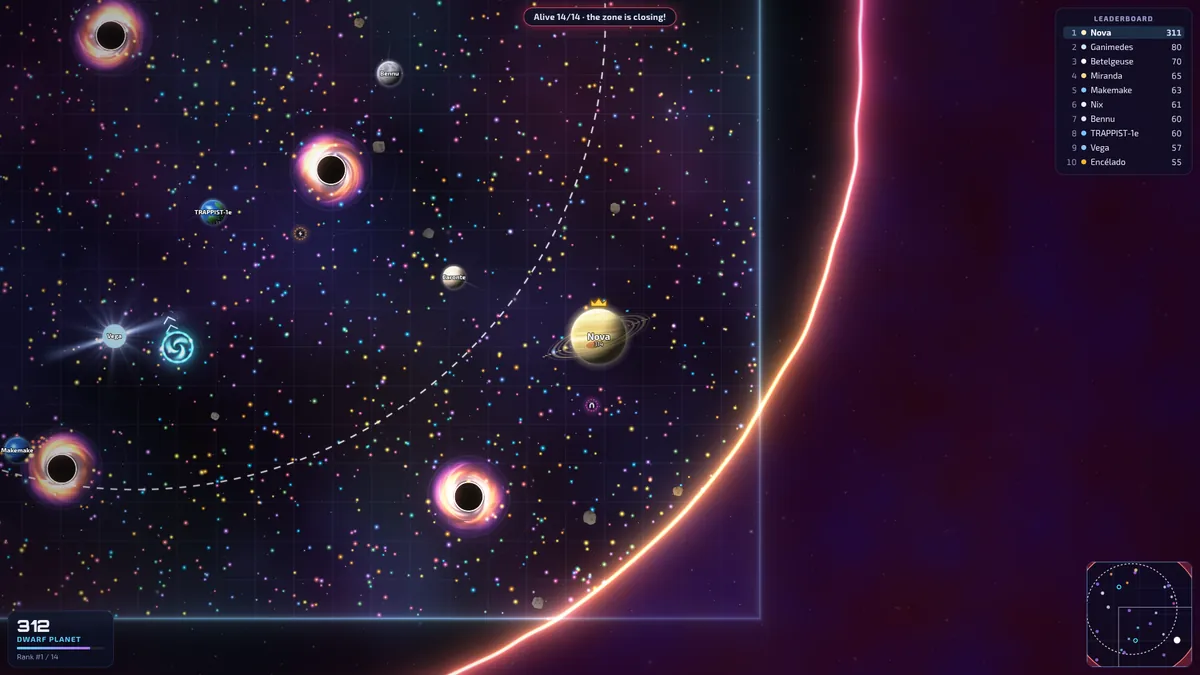
Collapse runs rounds back to back, forever. Each round has three phases:
- Countdown (12 seconds). Everyone in the room spawns, spread out and shielded, and can collect stardust. The HUD shows Round N starts in …. A round needs at least 2 planets; with fewer, the countdown waits 5 more seconds at a time (Waiting for more planets…).
- The fight. GO!: shields drop and nobody respawns. The safe zone starts as a circle covering the whole map, then moves and shrinks in 5 stages. Outside it you burn. The round ends when one planet is left, or after 5.5 minutes at most.
- Results (12 seconds). Round over: everyone's place, biggest mass and planets devoured. The winner sees VICTORY!; everyone else You finished #N of M. Then Next round in N s.
The 5 zone stages
| Stage | Holds | Then shrinks over | New size (radius) | Done at |
|---|---|---|---|---|
| 1 | 25 s | 25 s | 60% of the starting circle | 0:50 |
| 2 | 18 s | 22 s | 36% | 1:30 |
| 3 | 14 s | 18 s | 20% | 2:02 |
| 4 | 10 s | 16 s | 9% | 2:28 |
| 5 | 8 s | 18 s | Nothing: the zone closes completely | 2:54 |
- The next circle shows as a dashed line. It is picked inside the current zone and kept mostly on the map. With the Orbit physics modifier, the zone never closes in on a star.
- Burning outside: 12% of your mass per second plus 6 mass per second. A 100-mass planet lasts roughly 8 seconds out there. The Shield doesn't protect you from the zone.
- The outside dries up: stardust outside the zone slowly disappears, wormholes the zone swallows close, and once the zone is very small no new stardust or wormholes appear.
- Placing: each planet that goes out takes the place equal to the number still in the fight. If time runs out with several planets left, they are ranked by mass.
- Joining late: you can only enter during the countdown. Mid-round you see Round in progress — you join the next one, and if you're eaten the button says Spectate until the next round.
- A faster economy: planets start at 25 mass, the map has 25% more stardust, split pieces merge back sooner and comets come more often.
- Bots never respawn mid-round, and the room's bot population only changes between rounds.
Teams: Mars × Neptune × Earth
- Three teams, named after planets. Every newcomer, bot or human, joins the team with the fewest members.
- Your planet takes your team's look (Marte, Netuno or Terra) and a halo in the team colour, so you can tell sides apart at a glance.
- Allies can't eat each other and pass straight through each other. In the classic physics they don't pull each other either.
- Feed your team: ejected mass is how you pass mass to a teammate, or build up a big hunter.
Gravity chaos
Everything is turned up. Compared with Free for all on the same map:
- 2.4×black holes
- 2.6×power-ups
- 1.8×asteroids
- 2.5×stronger pull from big planets
- 1.6×stronger pull from black holes
- 35start mass (instead of 15)
- Split pieces merge back after 7 seconds instead of 12 (plus a little more for bigger pieces).
- Big planets lose mass faster: up to 0.3% per second instead of 0.18%.
- Comets come twice as often, with one more allowed at a time, and there's one extra pair of wormholes.
- With the Orbit physics modifier, Orbit's gravity replaces the classic pull, but the extra black holes, power-ups and asteroids stay.
Hazards and objects by mode
The game keeps each map topped up to these numbers: as things are eaten, burned or expire, new ones appear. Black holes launched by feeding can push the count up to twice the usual number.
| On the map | Orbit | Free for all | Collapse | Teams | Gravity chaos |
|---|---|---|---|---|---|
| Stars | 2 | 0 | 0 | 0 | 0 |
| Black holes | 5 | 9 | 9 | 9 | 22 |
| Wormhole pairs | 1 | 1 | 1 | 1 | 2 |
| Power-ups | 5 | 5 | 5 | 5 | 13 |
| Asteroids | 26 | 26 | 26 | 26 | 47 |
| Stardust specks | 2,530 | 2,300 | 2,875 | 2,300 | 2,300 |
| Comets (average gap, most at once) | 26 s, 2 | 26 s, 2 | 18 s, 2 | 26 s, 2 | 13 s, 3 |
| Map size | Small | Medium | Large |
|---|---|---|---|
| Width | 5,000 units | 7,000 units | 9,500 units |
| Stars (Orbit physics) | 1 | 2 | 3 |
| Black holes (Orbit / classic) | 3 / 5 | 5 / 9 | 10 / 17 |
| Wormhole pairs | 1 | 1 | 3 |
| Power-ups | 3 | 5 | 9 |
| Comets (average gap, most at once) | 51 s, 1 | 26 s, 2 | 14 s, 4 |
Stardust and asteroids scale with the map's area. Comet gaps are averages: each one comes somewhere between 0.6× and 1.4× that gap after the last. What each object does is in the gravity guide.
The 8 room modifiers
When you create a room you can switch on any combination of these. They show as chips next to the room in the Public rooms list.
- Orbit physics Orbit's momentum, gravity, 1 to 3 stars, collisions and eject thrust in Free for all, Collapse, Teams or Gravity chaos (Orbit already has them). Also 40% fewer black holes and 10% more stardust.
- Double gravity With Orbit physics, every pull is 1.6× stronger, but stars stay capped at 80% of your engine so you can always escape. With the classic physics, planets pull their prey twice as hard.
- Turbo Every planet's top speed ×1.35.
- Giant start Everyone spawns with 120 mass, instead of 15, 25 or 35.
- Comet shower Comets come 4× as often, with up to 3 more at a time.
- More wormholes Three times as many wormhole pairs.
- No black holes None at all.
- Golden dust Each speck of stardust is worth double: 2, 3 or 4 mass instead of 1, 1.5 or 2.
Power-ups
Power-ups float around the map in every mode: touch one to grab it. Each lasts 45 to 65 seconds before it fades, and devouring a comet also gives you a random one. Grabbing one you already have resets its timer.
Thruster · 8 s
Top speed ×1.55 and steering 1.4× quicker.
Shield · 7 s
Nobody can eat you, collisions can't break you, black holes can't shred you, and a star burns you at a quarter of the rate. It doesn't stop the Collapse zone.
Gravity magnet · 12 s
You pick up stardust from much further away: 150 units plus 45% of your radius beyond your edge.
Every fresh spawn also gets a 3-second Shield, and in Collapse everyone is shielded until the countdown ends.
Rooms, room size and bots
Create room lets you set:
- Mode and Modifiers.
- Visibility: Public rooms appear in the room list; Private ones can only be joined with the link or code.
- Map size: Small, Medium (default) or Large.
- Max players: 2 to 16 people, 12 by default. Bots don't count; when a room is full, newcomers see The room is full.
- Population with bots: 0 to 30, 14 by default. Bots top the room up to that many planets in total, and leave one by one as people join. Set it to 0 for humans only.
- Room name: optional, up to 24 characters.
About the bots
- Each bot gets a random skill level, which sets how fast it reacts, how often it goes for a split attack and how well it plays gravity.
- They're named after moons, dwarf planets, comets and stars, and sometimes come back as “someone else” after being eaten.
- Outside Collapse they respawn a few seconds after being eaten; in Collapse they wait for the next round like everyone else.
- How they fly with gravity is in the gravity guide.
Who runs the room
Multiplayer is peer-to-peer: whoever creates the room hosts the match in their own browser. The host regularly sends a checkpoint of the match to other players, so if the host leaves, one of them takes over with the same arena and stars, and players get 15 seconds to reconnect. Everyone in a room must run the same version of the game.
Play, invite links and room codes
The Play button
Play (“Joins a public room or opens one”) listens for public rooms for up to 5 seconds, then:
- skips full rooms, and Collapse rooms whose round is already under way;
- prefers Orbit rooms, then Free for all and Gravity chaos, then Collapse rooms still in their countdown, then Teams;
- among equals, picks the room with the most people;
- if there's nothing, or the room it chose has vanished or filled up, opens a new public Orbit room with the default settings (medium map, up to 12 players, bots up to 14).
Invite links and codes
- Room codes are 5 letters and digits. They never use I, O, 0 or 1, so they're easy to read out.
- Invite, in the in-game menu (Esc or the menu button), copies a link like
lagario.thomasar.dev/?r=K7QXP. On phones it opens the share sheet instead. - Opening the link turns the big menu button into Join · K7QXP.
- Join with code takes a bare code or a whole pasted invite link.
- Public rooms lists open public rooms with their name, mode, round status in Collapse, modifiers, players and bots, and the current leader. A room that's full shows Full.
Offline
Practice offline starts a private Orbit game in your own browser, just you against bots. The Tutorial is a small offline Orbit map with one star, a few harmless bots and Golden dust. These offline games are the only ones where opening the menu pauses the game; in a room with other people, the match carries on.
Pick a mode, stack some modifiers and send the link to your friends.
Play now